


Across healthcare, financial services, insurance, government, and other data-intensive industries, thousands of scheduled jobs still generate files every day. CSV exports, EDI feeds, XML reports, JSON payloads, fixed-width batch files – some of them written years ago, some decades ago.
These files move sensitive information between internal systems and external partners. And yet, for most organizations, one critical question remains unanswered:
What’s actually inside all those files?
You can’t control what you can’t see. But reverse-engineering decades of file-based processes isn’t realistic. Rewriting stable legacy jobs just to understand their contents is expensive, risky, and not tied to revenue.
So how do you get centralized, trustworthy visibility into sensitive data flowing through legacy systems – without disrupting the systems themselves?
Axway’s answer: a passive, AI-enhanced classification pipeline built with Transfer CFT, Amplify Fusion, and modern AI providers.
The governance visibility gap
Data Governance, Security, and Compliance teams need clarity on questions like:
- Which file flows contain PII or PHI?
- Which partners or internal systems receive sensitive data?
- Where do we have exposure we aren’t aware of?
- How can we respond quickly to audit requests?
The problem:
Most organizations don’t have a centralized inventory of their file flows – let alone visibility into what those files contain.
These flows span:
- Legacy systems
- Old batch schedulers
- Cobol/Java/.NET applications
- Departmental jobs and shell scripts
- Partner integrations built 10–20 years ago
Refactoring or revisiting them all is not an option. But ignoring the visibility gap isn’t an option either.
A smarter approach: passive discovery with Axway
Instead of modifying legacy pipelines, Axway enables organizations to observe files without touching them.
The architecture looks like this:
- Transfer CFT scans and mirrors files to Fusion.
- Fusion ingests each file and orchestrates the classification workflow.
- AI models analyze file samples and detect sensitive content, then returns a JSON report of what it found.
- Fusion writes structured results into a governance database for dashboards, audits, and remediation workflows.
Zero rewrites. Zero disruption. Maximum visibility.
How it works
1. Passive file mirroring with Transfer CFT
Transfer CFT monitors directories recursively where existing jobs deposit files. As new files appear, CFT securely mirrors them to Fusion.
This allows the enterprise to analyze:
- Every file to be transferred externally
- Every internal file distribution feed
- Every scheduled batch export
– all without changing a single line of legacy source code.
2. Classification orchestration with Fusion
Once Fusion receives a file, it triggers a flow that:
- Prepares the file to be attached along with the AI prompt to be submitted
- Prepares a governed, industry-specific AI prompt
- Sends the request to the selected AI model with returns a JSON report
- Fusion parses the JSON report
- Inserts results into governance databases (e.g., MongoDB)
Here is an example end-to-end flow:

This flow includes:
- SFTP Poll – Files mirrored from CFT
- Java Service – Generates a unique analysis ID for each report
- Map Step – Convert the payload from a file object to data object for injection into the AI prompt step
- OpenAI Step – Sends prompt + data sample to an AI engine
- Map Step – Normalizes AI response into summary + details
- Fork/Join – Writes to two DB tables, or two MongoDB collections (Analysis + AnalysisDetails)
This is all built visually – no microservices, no Python scripts, no ETL jobs.
Inside the AI step: how Fusion orchestrates deterministic, governed ai classification
The heart of this solution is the AI call inside Fusion. Below is a screenshot from the Fusion editor showing how the OpenAI connector is configured:
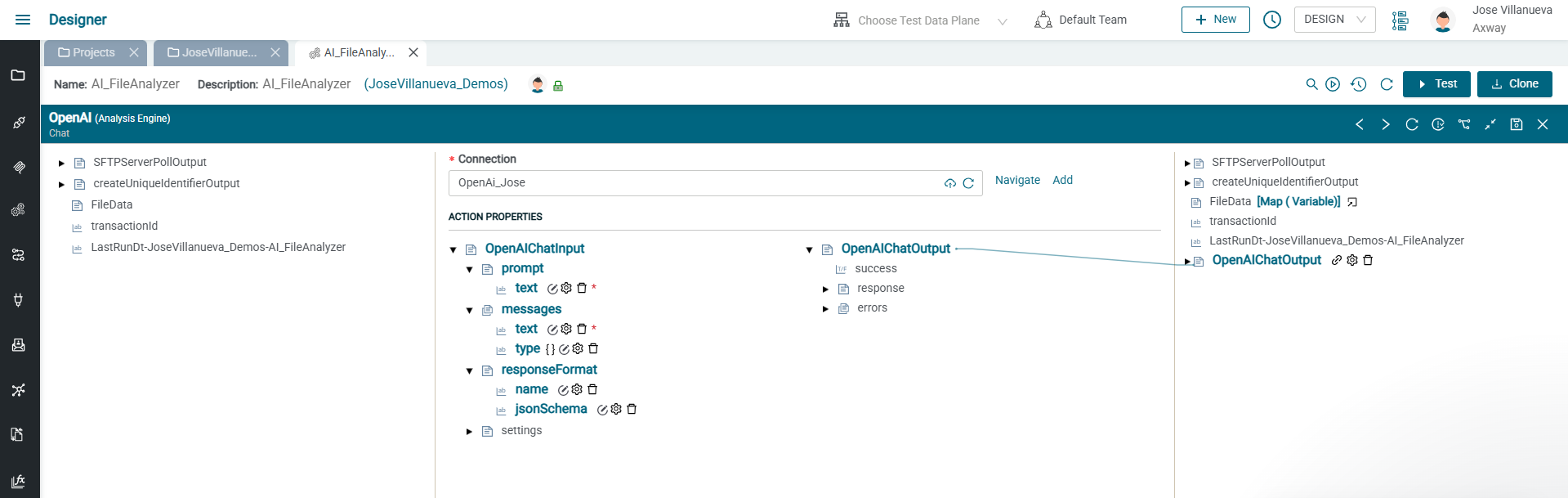
What’s happening here:
1. Fusion constructs a governed prompt
On the left side, Fusion builds the AI input:
- Healthcare-specific classification instructions
- Definitions of PII, PHI, and clinical categories
- Strict JSON requirements
- The file name, metadata, and sampled content
These instructions ensure the AI behaves like a deterministic classification engine, not a general-purpose text generator. Below is a sample of a healthcare-specific prompt, message and responseFormat.
Example prompt (instructions):
You receive:
1. An analysis identifier
2. File metadata
3. File content (full or sampled)
Your job is to:
• Detect whether the file contains any sensitive data
• Classify the content into specific healthcare-related categories
• Estimate confidence scores for each category
• Produce a JSON object that:
o Contains a high-level summary (for DataGovernance.Analysis)
o Contains detailed classification (for DataGovernance.AnalysisDetails)
You MUST:
• Output ONLY a single valid JSON object
• Follow the JSON schema: FileAnalysisSchema
• Use floating-point confidence scores between 0.0 and 1.0
• Use lower confidence instead of guessing when unsure
• Use “low”, “medium”, or “high” for overall risk level
• Do NOT include comments, explanations, or any text outside the JSON object
• Do NOT echo back the full file content sample
• Use the analysis_id provided in the input; do NOT invent or modify it
• Never generate null in JSON output; use empty quotes instead
________________________________________
DEFINITIONS (Healthcare Focus)
PHI (Protected Health Information):
Any health-related information that can be linked to an individual (per HIPAA).
PII (Personally Identifiable Information):
Data that can identify a person (name, address, phone, email, identifiers, etc.).
Financial data:
Payment cards, bank account numbers, billing account numbers, financial transactions.
________________________________________
Healthcare-related categories you should detect
1. PHI identifiers (HIPAA):
Names, addresses, dates, phone numbers, email, SSN, MRN, health plan numbers, account numbers, license numbers, vehicle IDs, device IDs, URLs with identifiers, IP addresses, biometric identifiers, photos, unique personal identifiers.
2. Clinical data:
Diagnoses, procedures, medications, allergies, labs, vitals, clinical notes, discharge summaries, care plans, etc.
3. Claims & billing data:
Claim numbers, policy/subscriber numbers, ICD/CPT/DRG codes, payer info, adjudication data, EOBs, charge/payment amounts.
4. Provider & facility identifiers:
NPI, DEA, state license numbers, facility IDs, provider IDs.
5. Operational healthcare data:
Schedules, ADT messages, capacity/utilization, workflow/event logs related to care delivery.
6. Device & IoT health data:
Medical device logs, telemetry, monitor data, device serial numbers, implant data.
7. Behavioral & sensitive clinical data:
Mental health, substance use, reproductive health, HIV status, genetic data, other specially protected data.
8. High-risk substances & sensitive topics:
Controlled substances, addiction treatment, stigmatized conditions when identifiable to a person.
9. General PII (non-healthcare):
Contact info, generic identifiers, etc.
________________________________________
Consistency Rules
• analysis_summary.analysis_id MUST equal analysis_details.analysis_id.
• analysis_summary fields MUST match analysis_details.sensitivity_summary and healthcare_categories.
• mongo_inserts.analysis.document MUST be an exact copy of analysis_summary.
• mongo_inserts.analysis_details.document MUST be an exact copy of analysis_details.
Always set:
• mongo_inserts.analysis.database = “DataGovernance”
• mongo_inserts.analysis.collection = “Analysis”
• mongo_inserts.analysis_details.database = “DataGovernance”
• mongo_inserts.analysis_details.collection = “AnalysisDetails”
________________________________________
If you cannot analyze the file
• Set can_analyze = false
• Provide a brief reason in analysis_notes
• Set all sensitivity booleans to false
• Set all confidence scores to 0.0
• Set overall_risk_level = “low”
Example Message (attachment):
FILE METADATA: <metadata from CFT>
FILE NAME: <file name from CFT>
FILE CONTENT SAMPLE: <data inserted here>Return ONLY the JSON object
2. Fusion enforces a JSON schema
The responseFormat.jsonSchema field ensures the model returns a JSON document matching the structure required by:
- DataGovernance.Analysis
- DataGovernance.AnalysisDetails
This prevents free-form responses, hallucinated text, or unstructured output.
Example responseFormat (expected response from AI service):
“$schema”: “https://json-schema.org/draft/2020-12/schema”,
“$id”: “https://example.com/schemas/analysis.schema.json”,
“type”: “object”,
“properties”: {
“analysis_summary”: {
“type”: “object”,
“properties”: {
“analysis_id”: { “type”: “string” },
“file_name”: { “type”: “string” },
“file_path”: { “type”: “string” },
“file_size_bytes”: { “type”: “number” },
“hash”: { “type”: “string” },
“detected_format”: { “type”: “string” },
“can_analyze”: { “type”: “boolean” },
“analysis_notes”: { “type”: “string” },
“contains_phi”: { “type”: “boolean” },
“contains_pii”: { “type”: “boolean” },
“contains_financial”: { “type”: “boolean” },
“overall_risk_level”: {
“type”: “string”,
“enum”: [“low”, “medium”, “high”]
},
“confidence_phi”: { “type”: “number” },
“confidence_pii”: { “type”: “number” },
“confidence_financial”: { “type”: “number” },
“phi_identifiers_present”: { “type”: “boolean” },
“clinical_data_present”: { “type”: “boolean” },
“claims_and_billing_data_present”: { “type”: “boolean” },
“provider_and_facility_identifiers_present”: { “type”: “boolean” },
“operational_healthcare_data_present”: { “type”: “boolean” },
“device_and_iot_health_data_present”: { “type”: “boolean” },
“behavioral_and_sensitive_clinical_data_present”: { “type”: “boolean” },
“high_risk_substances_and_sensitive_topics_present”: { “type”: “boolean” },
“general_pii_non_healthcare_present”: { “type”: “boolean” },
“likely_record_type”: { “type”: “string” },
“insert_timestamp_utc”: { “type”: “string”, “format”: “date-time” }
},
“required”: [
“analysis_id”,
“file_name”,
“file_path”,
“file_size_bytes”,
“detected_format”,
“can_analyze”,
“contains_phi”,
“contains_pii”,
“contains_financial”,
“overall_risk_level”
],
“additionalProperties”: false
},
“analysis_details”: {
“type”: “object”,
“properties”: {
“analysis_id”: { “type”: “string” },
“file_metadata”: {
“type”: “object”,
“properties”: {
“file_name”: { “type”: “string” },
“file_path”: { “type”: “string” },
“file_size_bytes”: { “type”: “number” },
“detected_format”: { “type”: “string” },
“hash”: { “type”: “string” },
“can_analyze”: { “type”: “boolean” },
“analysis_notes”: { “type”: “string” }
},
“required”: [
“file_name”,
“file_path”,
“file_size_bytes”,
“detected_format”,
“can_analyze”
],
“additionalProperties”: false
},
“sensitivity_summary”: {
“type”: “object”,
“properties”: {
“contains_phi”: { “type”: “boolean” },
“contains_pii”: { “type”: “boolean” },
“contains_financial”: { “type”: “boolean” },
“overall_risk_level”: {
“type”: “string”,
“enum”: [“low”, “medium”, “high”]
},
“confidence_phi”: { “type”: “number” },
“confidence_pii”: { “type”: “number” },
“confidence_financial”: { “type”: “number” }
},
“required”: [
“contains_phi”,
“contains_pii”,
“contains_financial”,
“overall_risk_level”
],
“additionalProperties”: false
},
“healthcare_categories”: {
“type”: “object”,
“properties”: {
“phi_identifiers”: {
“type”: “object”,
“properties”: {
“present”: { “type”: “boolean” },
“confidence”: { “type”: “number” }
},
“required”: [“present”, “confidence”],
“additionalProperties”: false
},
“clinical_data”: {
“type”: “object”,
“properties”: {
“present”: { “type”: “boolean” },
“confidence”: { “type”: “number” }
},
“required”: [“present”, “confidence”],
“additionalProperties”: false
},
“claims_and_billing_data”: {
“type”: “object”,
“properties”: {
“present”: { “type”: “boolean” },
“confidence”: { “type”: “number” }
},
“required”: [“present”, “confidence”],
“additionalProperties”: false
},
“provider_and_facility_identifiers”: {
“type”: “object”,
“properties”: {
“present”: { “type”: “boolean” },
“confidence”: { “type”: “number” }
},
“required”: [“present”, “confidence”],
“additionalProperties”: false
},
“operational_healthcare_data”: {
“type”: “object”,
“properties”: {
“present”: { “type”: “boolean” },
“confidence”: { “type”: “number” }
},
“required”: [“present”, “confidence”],
“additionalProperties”: false
},
“device_and_iot_health_data”: {
“type”: “object”,
“properties”: {
“present”: { “type”: “boolean” },
“confidence”: { “type”: “number” }
},
“required”: [“present”, “confidence”],
“additionalProperties”: false
},
“behavioral_and_sensitive_clinical_data”: {
“type”: “object”,
“properties”: {
“present”: { “type”: “boolean” },
“confidence”: { “type”: “number” }
},
“required”: [“present”, “confidence”],
“additionalProperties”: false
},
“high_risk_substances_and_sensitive_topics”: {
“type”: “object”,
“properties”: {
“present”: { “type”: “boolean” },
“confidence”: { “type”: “number” }
},
“required”: [“present”, “confidence”],
“additionalProperties”: false
},
“general_pii_non_healthcare”: {
“type”: “object”,
“properties”: {
“present”: { “type”: “boolean” },
“confidence”: { “type”: “number” }
},
“required”: [“present”, “confidence”],
“additionalProperties”: false
}
},
“additionalProperties”: false
},
“detected_entities”: {
“type”: “object”,
“properties”: {
“patient_name”: {
“type”: “object”,
“properties”: {
“present”: { “type”: “boolean” },
“confidence”: { “type”: “number” }
},
“required”: [“present”, “confidence”],
“additionalProperties”: false
},
“patient_address”: {
“type”: “object”,
“properties”: {
“present”: { “type”: “boolean” },
“confidence”: { “type”: “number” }
},
“required”: [“present”, “confidence”],
“additionalProperties”: false
},
“patient_phone”: {
“type”: “object”,
“properties”: {
“present”: { “type”: “boolean” },
“confidence”: { “type”: “number” }
},
“required”: [“present”, “confidence”],
“additionalProperties”: false
},
“patient_email”: {
“type”: “object”,
“properties”: {
“present”: { “type”: “boolean” },
“confidence”: { “type”: “number” }
},
“required”: [“present”, “confidence”],
“additionalProperties”: false
},
“date_of_birth”: {
“type”: “object”,
“properties”: {
“present”: { “type”: “boolean” },
“confidence”: { “type”: “number” }
},
“required”: [“present”, “confidence”],
“additionalProperties”: false
},
“medical_record_number”: {
“type”: “object”,
“properties”: {
“present”: { “type”: “boolean” },
“confidence”: { “type”: “number” }
},
“required”: [“present”, “confidence”],
“additionalProperties”: false
},
“health_plan_number”: {
“type”: “object”,
“properties”: {
“present”: { “type”: “boolean” },
“confidence”: { “type”: “number” }
},
“required”: [“present”, “confidence”],
“additionalProperties”: false
},
“claim_number”: {
“type”: “object”,
“properties”: {
“present”: { “type”: “boolean” },
“confidence”: { “type”: “number” }
},
“required”: [“present”, “confidence”],
“additionalProperties”: false
},
“provider_npi”: {
“type”: “object”,
“properties”: {
“present”: { “type”: “boolean” },
“confidence”: { “type”: “number” }
},
“required”: [“present”, “confidence”],
“additionalProperties”: false
},
“diagnosis_codes”: {
“type”: “object”,
“properties”: {
“present”: { “type”: “boolean” },
“confidence”: { “type”: “number” }
},
“required”: [“present”, “confidence”],
“additionalProperties”: false
},
“procedure_codes”: {
“type”: “object”,
“properties”: {
“present”: { “type”: “boolean” },
“confidence”: { “type”: “number” }
},
“required”: [“present”, “confidence”],
“additionalProperties”: false
},
“medication_info”: {
“type”: “object”,
“properties”: {
“present”: { “type”: “boolean” },
“confidence”: { “type”: “number” }
},
“required”: [“present”, “confidence”],
“additionalProperties”: false
},
“lab_results”: {
“type”: “object”,
“properties”: {
“present”: { “type”: “boolean” },
“confidence”: { “type”: “number” }
},
“required”: [“present”, “confidence”],
“additionalProperties”: false
},
“billing_amounts”: {
“type”: “object”,
“properties”: {
“present”: { “type”: “boolean” },
“confidence”: { “type”: “number” }
},
“required”: [“present”, “confidence”],
“additionalProperties”: false
},
“payment_card_data”: {
“type”: “object”,
“properties”: {
“present”: { “type”: “boolean” },
“confidence”: { “type”: “number” }
},
“required”: [“present”, “confidence”],
“additionalProperties”: false
},
“bank_account_data”: {
“type”: “object”,
“properties”: {
“present”: { “type”: “boolean” },
“confidence”: { “type”: “number” }
},
“required”: [“present”, “confidence”],
“additionalProperties”: false
},
“device_identifiers”: {
“type”: “object”,
“properties”: {
“present”: { “type”: “boolean” },
“confidence”: { “type”: “number” }
},
“required”: [“present”, “confidence”],
“additionalProperties”: false
},
“behavioral_health_info”: {
“type”: “object”,
“properties”: {
“present”: { “type”: “boolean” },
“confidence”: { “type”: “number” }
},
“required”: [“present”, “confidence”],
“additionalProperties”: false
},
“genetic_data”: {
“type”: “object”,
“properties”: {
“present”: { “type”: “boolean” },
“confidence”: { “type”: “number” }
},
“required”: [“present”, “confidence”],
“additionalProperties”: false
}
},
“additionalProperties”: false
},
“structure_insight”: {
“type”: “object”,
“properties”: {
“likely_record_type”: { “type”: “string” },
“example_fields”: {
“type”: “array”,
“items”: {
“type”: “object”,
“properties”: {
“field_name”: { “type”: “string” },
“inferred_type”: { “type”: “string” },
“inferred_semantic_role”: { “type”: “string” }
},
“required”: [“field_name”],
“additionalProperties”: false
}
}
},
“required”: [“likely_record_type”],
“additionalProperties”: false
}
},
“required”: [“analysis_id”, “file_metadata”, “sensitivity_summary”],
“additionalProperties”: false
}
},
“required”: [“analysis_summary”, “analysis_details”],
“additionalProperties”: false
}
3. Any AI model can be used
While the screenshot shows OpenAI, Fusion also offers native connectors for:
- Azure OpenAI
- AWS Bedrock (Claude, Titan, Llama models, etc.)
- Anthropic Claude
- Ollama (local inference)
And organizations can plug in their own self-hosted models easily – Fusion treats any HTTP-based AI service the same way.
This allows enterprises to choose the model that aligns with their security, compliance, and cloud strategy.
4. Fusion handles errors, retries, and mapping
The right panel shows how Fusion captures:
- success/failure
- errors
- the validated JSON response
Downstream steps simply map the fields – no parsing logic, no exception handling code, no maintenance overhead.
What the output looks like
The AI returns a governed JSON response containing two objects:
1. analysis_summary
A dashboard-ready summary with:
- Whether PII/PHI/financial data is present
- Confidence scores
- Overall risk level
- Key healthcare category flags
- File metadata
- Timestamps
2. analysis_details
A full classification record with:
- Detailed PHI/PII indicators
- Clinical entities
- Claims and billing identifiers
- Provider IDs (e.g., NPI)
- Device + IoT indicators
- Behavioral health data flags
- Structured field-level insights
Fusion then stores both objects into MongoDB:
- DataGovernance.Analysis
- DataGovernance.AnalysisDetails
This creates a centralized, queryable inventory of sensitive file flows.
Example output from AI:
“analysis_summary”: {
“analysis_id”: “”,
“file_name”: “text01.txt”,
“file_path”: “”,
“file_size_bytes”: 0,
“hash”: “”,
“detected_format”: “text/csv”,
“can_analyze”: true,
“analysis_notes”: “”,
“contains_phi”: true,
“contains_pii”: true,
“contains_financial”: true,
“overall_risk_level”: “high”,
“confidence_phi”: 0.95,
“confidence_pii”: 0.95,
“confidence_financial”: 0.95,
“phi_identifiers_present”: true,
“clinical_data_present”: true,
“claims_and_billing_data_present”: true,
“provider_and_facility_identifiers_present”: true,
“operational_healthcare_data_present”: true,
“device_and_iot_health_data_present”: false,
“behavioral_and_sensitive_clinical_data_present”: false,
“high_risk_substances_and_sensitive_topics_present”: false,
“general_pii_non_healthcare_present”: false,
“likely_record_type”: “Billing and Demographics”,
“insert_timestamp_utc”: “”
},
“analysis_details”: {
“analysis_id”: “”,
“file_metadata”: {
“file_name”: “text01.txt”,
“file_path”: “”,
“file_size_bytes”: 0,
“detected_format”: “text/csv”,
“hash”: “”,
“can_analyze”: true,
“analysis_notes”: “”
},
“sensitivity_summary”: {
“contains_phi”: true,
“contains_pii”: true,
“contains_financial”: true,
“overall_risk_level”: “high”,
“confidence_phi”: 0.95,
“confidence_pii”: 0.95,
“confidence_financial”: 0.95
},
“healthcare_categories”: {
“phi_identifiers”: {
“present”: true,
“confidence”: 0.95
},
“clinical_data”: {
“present”: true,
“confidence”: 0.95
},
“claims_and_billing_data”: {
“present”: true,
“confidence”: 0.95
},
“provider_and_facility_identifiers”: {
“present”: true,
“confidence”: 0.95
},
“operational_healthcare_data”: {
“present”: true,
“confidence”: 0.9
},
“device_and_iot_health_data”: {
“present”: false,
“confidence”: 0.0
},
“behavioral_and_sensitive_clinical_data”: {
“present”: false,
“confidence”: 0.0
},
“high_risk_substances_and_sensitive_topics”: {
“present”: false,
“confidence”: 0.0
},
“general_pii_non_healthcare”: {
“present”: false,
“confidence”: 0.0
}
},
“detected_entities”: {
“patient_name”: {
“present”: true,
“confidence”: 0.95
},
“patient_address”: {
“present”: true,
“confidence”: 0.95
},
“patient_phone”: {
“present”: true,
“confidence”: 0.95
},
“patient_email”: {
“present”: true,
“confidence”: 0.95
},
“date_of_birth”: {
“present”: true,
“confidence”: 0.95
},
“medical_record_number”: {
“present”: true,
“confidence”: 0.95
},
“health_plan_number”: {
“present”: true,
“confidence”: 0.95
},
“claim_number”: {
“present”: true,
“confidence”: 0.95
},
“provider_npi”: {
“present”: true,
“confidence”: 0.95
},
“diagnosis_codes”: {
“present”: true,
“confidence”: 0.95
},
“procedure_codes”: {
“present”: true,
“confidence”: 0.95
},
“medication_info”: {
“present”: false,
“confidence”: 0.0
},
“lab_results”: {
“present”: false,
“confidence”: 0.0
},
“billing_amounts”: {
“present”: true,
“confidence”: 0.95
},
“payment_card_data”: {
“present”: false,
“confidence”: 0.0
},
“bank_account_data”: {
“present”: false,
“confidence”: 0.0
},
“device_identifiers”: {
“present”: false,
“confidence”: 0.0
},
“behavioral_health_info”: {
“present”: false,
“confidence”: 0.0
},
“genetic_data”: {
“present”: false,
“confidence”: 0.0
}
},
“structure_insight”: {
“likely_record_type”: “Billing”,
“example_fields”: [
{
“field_name”: “patient_name”,
“inferred_type”: “string”,
“inferred_semantic_role”: “PHI”
},
{
“field_name”: “diagnosis_code”,
“inferred_type”: “string”,
“inferred_semantic_role”: “clinical_diagnosis”
},
{
“field_name”: “charge_amount”,
“inferred_type”: “number”,
“inferred_semantic_role”: “billing”
}
]
}
}
}
Why this approach matters
Centralized visibility
For the first time, governance teams get a searchable index of every file, every partner, every system, and every category of sensitive data detected.
Audit and compliance readiness
Instead of manually reviewing decades of file flows, teams can answer the following questions in seconds:
- “Which partners receive PHI?”
- “Which jobs output financial identifiers?”
- “Which folders contain clinical data?”
Zero disruption
Legacy systems continue running as-is. Jobs don’t change. No modernization effort required.
AI flexibility
Use OpenAI, Azure OpenAI, Bedrock, Claude, or a private model. No lock-in, no code rewrites.
Scalable and future-proof
This same pipeline can later:
- Trigger alerts on high-risk files
- Block outbound transfers
- Enforce partner access policies
- Drive remediation workflows
- Feed lineage and governance dashboards
This is not a one-off script. It’s a sustainable control capability.
You don’t need to rewrite 20 years of batch jobs to understand your file ecosystem. With Transfer CFT, Amplify Fusion, and a modern AI model, enterprises can gain immediate insight into the sensitive data traveling through their organization.
This architecture delivers:
- Fast time to value
- Minimal operational disruption
- Strong compliance posture
- AI-powered intelligence wrapped in deterministic governance controls
If your organization needs visibility into its file flows – or wants a safer, faster path to understanding where sensitive data lives – Axway can help you launch a pilot and start seeing results within days.
Build your integration foundation for AI