


Securing your API may sound complicated, but there are some basic things you can consider when setting up your API in a more secure way than just exposing it wide open to the public. Authenticating a consumer is a first step towards:
- Allowing access to your APIs only for a designated group of clients
- Being able to say who is consuming your APIs and how much
- Allowing you to block clients that misbehave or are no longer part of the target group of clients
In this blog, I will review the two most popular mechanisms to protect your APIs: API key and OAuth2, but keep in mind there is much more to API security than this. For more reading on the topic, check out API protection: How to create a fortress around your data.
API keys
An API key is a unique string that identifies the application calling an API and grants it a defined level of access. API keys are the lightweight authentication option: simple to issue, simple to revoke, simple to rotate. They work well for server-to-server traffic where the calling application has a stable identity, and they are appropriate for read-only or low-sensitivity APIs. They are not appropriate as the only line of defense for any API exposing personal data or money, because anyone who steals the key can impersonate the application without further checks.
Introducing API keys is easy, since all API gateways nowadays support this mechanism. Just issue a “secret” or “phrase” between you and the consumer. Every time a protected API is called, this key must be present and an API gateway will be able to verify it.
Setting an API key as an API security measure is very easy, but it is important to follow best practices. There are also drawbacks.
For example, you should avoid putting the API key inside the URL as a “query parameter,” because proxies and all involved systems are likely to store it in their logs. It is better to use a dedicated HTTP header.
There is a security risk with using an API key: any client with a valid key can access a protected API(s). Using TLS (Transport Layer Security) helps to alleviate such a situation, but the risk still exists. If you want to use API key protection, at the very least you should generate a separate API key for a specific app/client and API. That way, if this API key is compromised, the security impact is smaller.
One way is to extend the authentication with an additional secret that needs to be provided too. This alone does not introduce more security, but you can use this to do some smart things like HMAC (Hash-based Message Authentication Code).
HMAC starts to include an encrypted signature as an API key instead of submitting the real key. With some nice additions like a timestamp, this signature can be a powerful way to introduce protection.
See for example how Amazon Web Services style API keys have been designed including a key ID and a secret key which are used together to authenticate securely the client. The API key ID is included in all requests to identify the client. The secret key is known only to the client and the API gateway.
It will require some code on your client and server, but most languages and frameworks provide support. To learn more, check out this blog post to learn how to protect your API Keys.
OAuth2
OAuth 2.0 grant types and when to use each
OAuth 2.0 defines several grant types (also called flows) for different application architectures. Picking the wrong one is the most common OAuth implementation mistake.
- Authorization Code with PKCE. The default for any user-facing application: web apps, single-page apps, mobile apps. The PKCE extension protects public clients that cannot keep a secret. Use this unless you have a specific reason not to.
- Client Credentials. Machine-to-machine traffic where no user is involved. The application authenticates itself with a client ID and secret and gets a token scoped to the application. Use this for backend service calls and scheduled jobs.
- Refresh Token. Used alongside another grant to obtain a new access token without forcing the user to re-authenticate. Store refresh tokens securely on the server, never in browser local storage.
- Device Authorization Grant. For input-constrained devices like smart TVs and IoT devices. The device shows a code, the user authenticates on a separate device, and the token comes back to the original device.
- Implicit and Resource Owner Password Credentials. Both deprecated as of OAuth 2.1. If you are still using these, plan a migration to Authorization Code with PKCE.
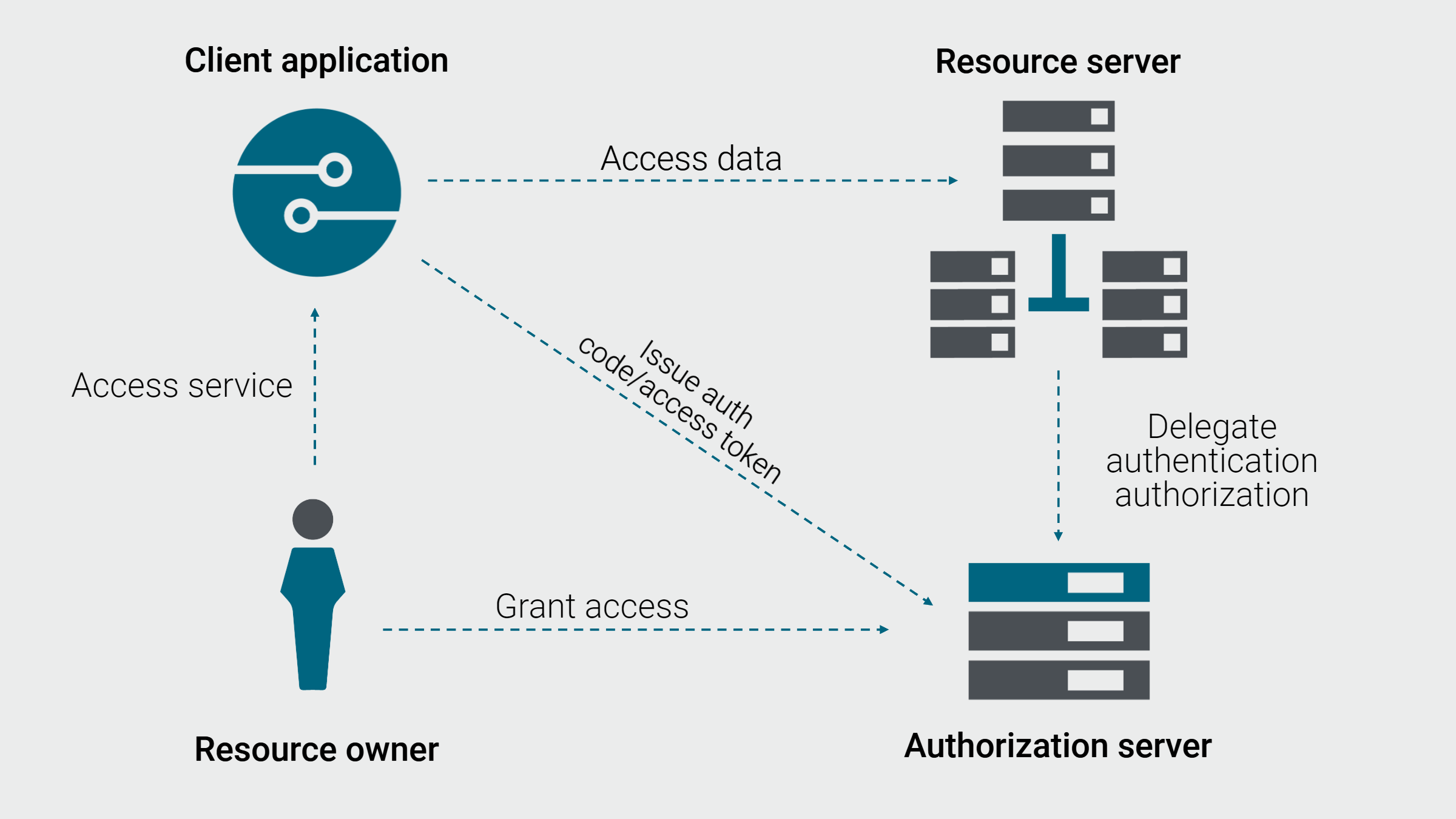
OAuth 2.0 is an authorization framework that lets a client application access an API on behalf of a specific user (or service), without ever handling that user passwords. The end user authenticates against an identity provider, the identity provider issues a scoped access token, and the client presents that token to the API. The token carries the identity of the user, the application acting on their behalf, and the specific permissions (scopes) the user has granted, so the API can make fine-grained authorization decisions without trusting the client.
While the API key mechanism is easy and well understood, OAuth provides an alternative solution, considered more secure and better suitable to support a large number of users. OAuth is a way to separate the Authentication Process from the Access to the Resource and therefore limit the exposure of the credentials.
OAuth relies on a delegation mechanism. App providers rely on a centralized service (called an Authorization Server) that authenticates users and generates Access Tokens. These tokens are used to log in to any application protected by OAuth and access resources.
Some usage examples could be:
- A Gmail user would like LinkedIn to access their contact list without sharing their Gmail username and password
- A photo printing website user would like the website to access his pictures on Flickr
- A company would like its customers to access a subset of its services through a partner website without the partner knowing the customer credentials
- A company would like to develop a mobile app where the user credentials are never stored on the mobile app
One scenario you often see is Social Login where you use GitHub, LinkedIn, Google, or Facebook to log into a Web app. For example, Google can act as an Authorization Server.
When you access your Web app protected with OAuth, that app redirects you to Google Authorization Server. You log in to your Google account and accept consent listing the permissions the Authorization Server will give to the app.
Now, your Web app can get an access token from Google Authorization Server to access resources (like APIs, email, photos, posts, etc.) on your behalf. This is known as Authorization Code Flow.
OAuth2 vs API keys
API authentication methods at a glance
API keys and OAuth 2.0 are not the only options. Most enterprise APIs end up combining several of these methods in a layered defense. The right method depends on what you are trying to authenticate (application vs user vs machine) and how sensitive the data is.
| Method | What it authenticates | Best for | Main weakness |
|---|---|---|---|
| API key | The calling application | Server-to-server, throttling, metering, low-sensitivity reads | Anyone with the key can impersonate the app; no user context |
| OAuth 2.0 access token | The end user on whose behalf the app is calling | User-specific data, third-party app access, fine-grained scopes | Setup complexity, token lifetime management, refresh token storage |
| JWT (JSON Web Token) | Self-contained signed claims about a user or service | Stateless microservice-to-microservice calls, internal trust between services | Cannot be revoked once issued (without a deny-list); signing key compromise is fatal |
| mTLS (mutual TLS) | Both client and server, by certificate | High-trust machine-to-machine, regulated environments, internal service mesh | Certificate lifecycle complexity; rotation at scale is operationally expensive |
| OpenID Connect (OIDC) | The end user identity, built on top of OAuth 2.0 | Single sign-on, identity-aware APIs, federated identity providers | Same as OAuth 2.0 plus the added complexity of an identity layer |
A federated API management platform like Amplify Fusion enforces all of these methods consistently across every gateway and runtime in your estate, so the choice of auth method stays a design decision instead of becoming an operational nightmare.
OAuth 2.0 and API keys solve different problems and most production APIs need both. API keys identify the calling application and gate access to coarse-grained features. OAuth 2.0 identifies the end user on whose behalf the application is acting and gates access to fine-grained, user-specific data. The right pattern for most APIs is to require an API key for every call (so you can throttle, meter, and revoke per application) and require an OAuth 2.0 access token for any call that touches user data (so the API knows which user and what they consented to).
API keys can be an easy way to enforce some authentication, while OAuth is more sophisticated with more options.
Here are some of the benefits of OAuth2 over the API key:
- Access token is tied to a specific user, not an app
- User credentials are never exposed to an app, authentication is done in a single place – Authorization Server
- Management of users and tokens are delegated to a 3rd party (must be trusted by your Web or mobile apps)
- Access tokens must be re-generated periodically (the period is configurable)
- It is much easier to revoke a compromised Access token, and the impact is usually much smaller than with an API key
Be aware there are some caveats with OAuth 2.0, it’s not secure by default! Notably, it requires more knowledge to implement correctly, not only on the client, but also on the server side.
Protect your APIs with a layered security approach
Protecting your API does not have to be difficult. API keys and OAuth are a first step toward a more secure API. Please note that API throttling and quota limits should also be applied, together with other measures and best practices.
API management tools such as Axway’s Amplify Platform provide an easy way to protect your APIs and turn on authentication with a few clicks. Automated security tools like linting allow enterprises to perform semantic checks on APIs, ensuring they meet all corporate standards and are free of issues. Axway API Gateway’s Common Criteria, Evaluation Assurance Level 4 augmented or plus (CC EAL4+) certification means we can help you meet the most demanding security requirements.
Especially important is a universal API management foundation, where all your APIs are brought together in one repository. This means they can be easily managed, discovered, and secured, regardless of where they are deployed. And common tracking and reporting allow you to pull API usage metrics to get a complete view of your APIs.
Once you’ve secured your APIs, you’ll be able to make the shift to driving engagement and maximizing value for API products with the tools you need to deliver real business capability.
Download our checklist of 10 best practices for layered API security.